Marketing Performance Dashboard: KPIs You Should Track Weekly

A marketing performance dashboard is only useful if it changes what you do next. For most local businesses, the right cadence is weekly: often enough to catch problems early (wasted ad spend, tracking breaks, lead quality drops), but not so frequent that you end up reacting to noise.
Below is a practical, weekly KPI set you can use to build a marketing performance dashboard that is readable in 5 minutes and actionable in 30.
What a “weekly” marketing performance dashboard should do
Weekly dashboards are for decisions, not reporting theater. They should answer:
- Are we getting enough demand?
- Is that demand turning into qualified leads or sales?
- Are we paying a sustainable cost to acquire customers?
- Which channel deserves more budget or attention this week?
That means your dashboard needs a clear “line of sight” from traffic to revenue (or at least to leads you trust).
The 5 rules of a dashboard you will actually use
Most dashboards fail for predictable reasons: too many charts, unclear definitions, and metrics that do not map to business outcomes.
Use these rules when building yours.
1) Tie every KPI to a decision
If a metric does not trigger a weekly action (increase budget, pause campaign, fix landing page, follow up leads faster), it does not belong on the weekly view.
2) Prefer rates over raw numbers
Raw counts (sessions, clicks) can be misleading as you scale. Rates stay meaningful:
- Conversion rate
- Lead-to-customer rate
- Cost per lead
- Return on ad spend
3) Keep one “source of truth” per metric
Pick where each KPI comes from and stick to it:
- Website behavior: GA4
- Paid performance: Google Ads, Meta Ads
- Lead quality and revenue: CRM or pipeline spreadsheet
If you blend sources without clear rules, the team will argue about numbers instead of improving performance.
4) Use consistent time windows
Weekly means the last 7 full days, compared to the prior 7 full days. Avoid comparing a partial week to a full week.
5) Track quality, not just quantity
A common failure mode for local lead generation is celebrating more leads while revenue stays flat. Weekly dashboards should include at least one quality KPI (qualified lead rate, booked call rate, close rate).
Core weekly KPIs (the ones most businesses should start with)
If you want a minimal dashboard that works across industries, start here.
1) Demand and acquisition
These KPIs tell you whether your marketing is generating enough top-of-funnel volume.
- Users (or sessions): Directional indicator of demand.
- New users %: Helps you spot reliance on returning traffic.
- Channel mix (Organic Search, Paid Search, Paid Social, Referral, Direct): Shows where growth is coming from.
Important: traffic is not a success metric by itself. It becomes useful when paired with conversion and cost.
2) Lead and conversion performance
These KPIs show whether your website and offers are turning attention into action.
- Primary conversion count: Form submissions, phone calls, booking requests, purchases.
- Conversion rate (CVR): Conversions / sessions (or conversions / landing page sessions).
- Top landing pages by conversions: So you know what to protect and what to fix.
If you are using GA4, define conversions as “key events.” Google’s guidance is here: GA4 key events (conversions).
3) Speed-to-lead (optional but powerful)
For many local businesses, the fastest win is responding faster than competitors.
- Median time to first response: How long it takes to contact a lead.
- Contact rate: % of leads you successfully reached.
Even if your ads and SEO are excellent, slow follow-up can make performance look “mysteriously bad.”
4) Revenue and efficiency
You do not need perfect attribution to run an effective weekly dashboard. You do need a few grounded efficiency numbers.
- Spend (by channel)
- Cost per lead (CPL)
- Cost per acquisition (CPA) (if you can track customers, not just leads)
- Return on ad spend (ROAS) (ecommerce) or marketing cost as % of revenue (service businesses)
5) Lead quality and pipeline movement
This is where many dashboards stop being “marketing-only” and start becoming a real business tool.
- Qualified leads: Count based on your definition.
- Qualified lead rate (QLR): Qualified leads / total leads.
- Opportunity or quote volume: If you sell via proposals.
- Close rate: Customers / qualified leads.
If you do not have a CRM, you can still track this weekly in a simple spreadsheet. The point is consistency.
Weekly KPI definitions you can copy (with formulas)
Use the table below as the backbone of your marketing performance dashboard. It focuses on metrics you can act on within a week.
| KPI | What it tells you | Simple formula | What you typically do if it drops |
|---|---|---|---|
| Sessions (or Users) | Demand volume | Platform metric | Investigate channel mix, search visibility, budget caps |
| Conversion count | Total actions taken | Platform metric | Check tracking, forms, phone number, landing page changes |
| Conversion rate (CVR) | Page and offer effectiveness | Conversions / Sessions | Improve landing page, tighten offer, reduce friction, test CTA |
| Cost per lead (CPL) | Paid efficiency (lead gen) | Spend / Leads | Fix targeting, ads, landing page relevance, negative keywords |
| Qualified lead rate (QLR) | Lead quality | Qualified leads / Total leads | Adjust keyword intent, add qualifying fields, refine messaging |
| Cost per qualified lead (CPQL) | True acquisition efficiency | Spend / Qualified leads | Reallocate budget to higher intent campaigns and pages |
| Close rate | Sales effectiveness and lead quality | Customers / Qualified leads | Improve follow-up, scripts, pricing clarity, lead screening |
| Revenue (weekly) | Output | Booked revenue | Diagnose pipeline stage with the biggest drop |
Channel-specific weekly KPIs (SEO, Google Ads, Meta)
Once your “core” dashboard is in place, add a small module per channel you actively invest in.
SEO (weekly view)
SEO moves slower than ads, but weekly monitoring helps you catch technical issues and content decay.
Track:
- Organic sessions (week over week)
- Organic conversions (not just traffic)
- Top organic landing pages by conversions
- Search Console clicks and impressions (directional)
Weekly actions:
- If clicks fall while impressions stay stable, your titles or snippets may be losing clicks.
- If impressions fall, you may have an indexing issue, seasonality, or ranking loss.
Google Search Ads (weekly view)
Search intent changes quickly and budgets can leak fast.
Track:
- Spend
- Conversions and conversion rate
- CPL or CPA
- Search terms quality (are you matching high-intent queries?)
- Impression share lost to budget (if you are consistently capped)
Weekly actions:
- Add negatives based on irrelevant search terms.
- Tighten match types when quality drops.
- Shift budget toward campaigns with the best CPQL, not just the cheapest clicks.
Meta Ads (weekly view)
Meta is often creative-driven and can swing week to week.
Track:
- Spend
- Leads (or purchases)
- CPL and CVR
- Frequency (to spot creative fatigue)
- Landing page view to lead rate (if available)
Weekly actions:
- Rotate creative if frequency rises and CVR falls.
- Test new hooks and audiences, but do not change everything at once.
Email and remarketing (if you have it)
Email is usually one of the highest leverage “efficiency” channels.
Track:
- List growth
- Click rate
- Leads or revenue influenced (even directional)
A simple dashboard layout that works for local businesses
If you are using Looker Studio, a spreadsheet, or a BI tool, structure matters more than the tool.
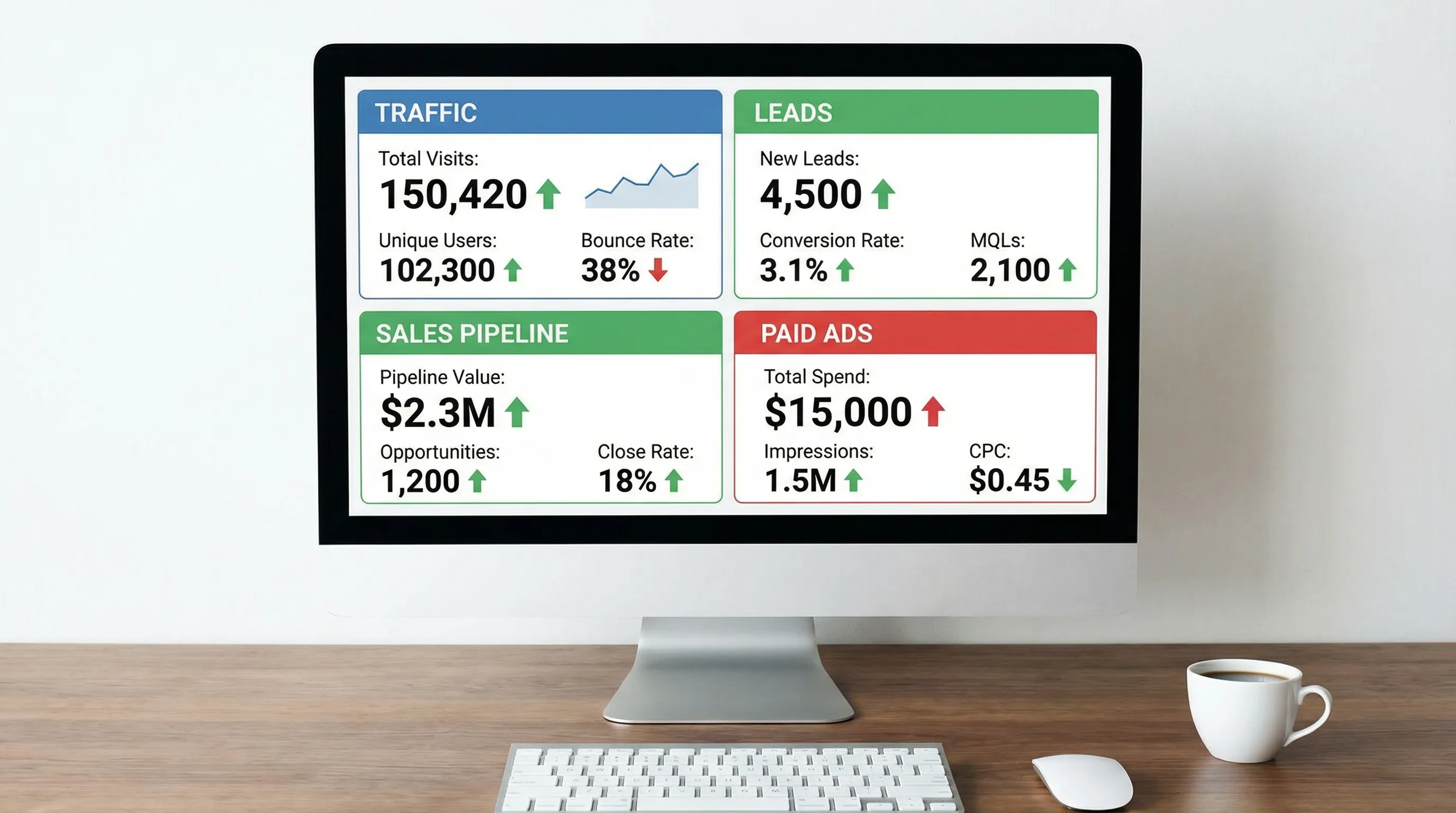
Use a single page with four blocks:
Block 1: Executive snapshot (top row)
Show 6 to 8 KPIs only:
- Sessions
- Conversions
- CVR
- Spend
- CPL (or CPA)
- Qualified leads
- Revenue (or booked jobs)
- Close rate
Add week-over-week change and a small 8 to 12 week trend line.
Block 2: Channel performance table
This is where you decide what to scale or cut.
| Channel | Weekly goal | KPI to watch | Best “next action” trigger |
|---|---|---|---|
| Organic Search | Sustainable leads | Organic conversions | Publish or refresh the page driving leads, fix technical issues |
| Google Search Ads | High intent leads | CPQL | Expand high-performing terms, add negatives, fix landing pages |
| Meta Ads | Demand creation | CPL plus QLR | Refresh creative, narrow offer, retarget site visitors |
| Referral / Partnerships | Quality leads | Close rate | Double down on the best partner sources |
Block 3: Landing page and offer diagnostics
Show your top 5 landing pages by conversions, with CVR and engagement.
This is often where the biggest gains live because it improves every channel at once.
Block 4: Lead quality and pipeline
Marketing “performance” is not real if sales outcomes do not follow.
At minimum, show:
- Total leads
- Qualified leads
- Booked calls or appointments
- Closed deals
Industry note: why specialized teams should add workflow KPIs
If you operate in regulated or document-heavy industries (law, healthcare, insurance), marketing performance is often constrained by operational throughput. If intake is slow, follow-up is inconsistent, or documentation is a bottleneck, your dashboard should include one workflow KPI that connects marketing to fulfillment.
For example, law firms may track “cases accepted per week” alongside “leads per week” to avoid scaling ads that overwhelm intake. Tools like TrialBase AI for litigation support exist because speed and accuracy in downstream work can directly impact how much demand you can profitably generate.
Common weekly dashboard mistakes (and what to do instead)
Mistake 1: Tracking too many KPIs
If you have 40 metrics, you have zero priorities. Keep the weekly view tight and create a separate monthly report for deeper analysis.
Mistake 2: Treating platform leads as equal
Not all leads are the same. A “lead” from a broad keyword can be worth a fraction of a lead from high-intent search. Track qualified leads, even if qualification is manual.
Mistake 3: Not validating tracking
Weekly dashboards should include a quick sanity check: do leads in your form tool or CRM match conversions in analytics? A broken tag can create fake improvement or fake decline.
Mistake 4: No owner and no action
Assign a single owner to the dashboard and end each weekly review with 1 to 3 decisions. Otherwise it becomes a passive scoreboard.

Frequently Asked Questions
What KPIs should I track weekly in a marketing performance dashboard? Track sessions, conversions, conversion rate, spend, CPL or CPA, qualified leads, and at least one revenue or pipeline KPI (like close rate or booked jobs).
How is a weekly dashboard different from a monthly marketing report? Weekly dashboards are for fast decisions and course corrections. Monthly reports are better for trend analysis, strategy changes, and deeper attribution review.
What is the most important KPI for local service businesses? Usually a quality KPI, like qualified leads and cost per qualified lead, because lead volume alone can hide wasted spend and low-intent inquiries.
Do I need a CRM to measure marketing performance? A CRM helps, but you can start with a simple spreadsheet that records lead source, qualification status, and outcome. Consistency matters more than tooling.
How do I know if my dashboard numbers are accurate? Compare three points weekly: analytics conversions, form or call tracking logs, and the leads actually received in email or CRM. Large gaps often signal broken tracking.
Want help turning your dashboard into more leads (not just prettier charts)?
If your KPIs show that conversions are lagging, the fix is often foundational: a faster website, clearer service pages, better local SEO, and landing pages built for lead capture.
Kvitberg Marketing builds free, professional, SEO-optimized websites for local businesses, then walks you through the finished site before you decide whether to buy. If you want to pair a strong website with optional growth services like SEO campaigns or Google Search Ads management, explore Kvitberg Marketing at kvitbergmarketing.com.